<?xml version="1.0" encoding="utf-8"?><feed xmlns="http://www.w3.org/2005/Atom" xml:lang="en-GB"><generator uri="https://jekyllrb.com/" version="4.3.2">Jekyll</generator><link href="https://lildude.co.uk/atom.xml" rel="self" type="application/atom+xml" /><link href="https://lildude.co.uk/" rel="alternate" type="text/html" hreflang="en-GB" /><updated>2023-10-11T17:01:08+01:00</updated><id>https://lildude.co.uk/atom.xml</id><title type="html">@lildude</title><subtitle>But what is it good for?</subtitle><author><name>@lildude</name></author><entry><title type="html"></title><link href="https://lildude.co.uk/this-is-so-me-dont" rel="alternate" type="text/html" title="" /><published>2021-12-09T20:39:13+00:00</published><updated>2021-12-09T20:39:13+00:00</updated><id>https://lildude.co.uk/this-is-so-me-dont</id><content type="html" xml:base="https://lildude.co.uk/this-is-so-me-dont"><![CDATA[<p>This is so me: <em>"Don't spend 6 minutes doing something by hand when you can spend 6 hours failing to automate it."</em> (<a href="https://twitter.com/camilaleniss/status/1370883721319026690">source</a>)</p>]]></content><author><name>@lildude</name></author><summary type="html"><![CDATA[This is so me: "Don't spend 6 minutes doing something by hand when you can spend 6 hours failing to automate it." (source)]]></summary></entry><entry><title type="html">Speeding Up My ZSH Shell</title><link href="https://lildude.co.uk/speeding-up-my-zsh-shell" rel="alternate" type="text/html" title="Speeding Up My ZSH Shell" /><published>2021-11-29T10:21:20+00:00</published><updated>2021-11-29T10:21:20+00:00</updated><id>https://lildude.co.uk/speeding-up-my-zsh-shell</id><content type="html" xml:base="https://lildude.co.uk/speeding-up-my-zsh-shell"><![CDATA[<p>ZSH has been my shell for well over fifteen years with my configuration framework of choice being <a href="https://github.com/sorin-ionescu/prezto">prezto</a> for the last eight years of those. In that time, I've tweaked my prompt and configuration as my needs have evolved and as I encountered performance issues, and it's those performance issues that drew me to dig into my ZSH configuration and prompt again.</p>

<h3 id="pesky-git-status-information">Pesky git status information</h3>

<p>The biggest issue has been the fact I like git status information in my prompt - who doesn't. I'd been using the native ZSH VCS functions for a long time, which wasn't normally a problem on small repositories, but these functions perform terribly on very large repos, like the main GitHub.com repo (it's massive), and repos with lots of submodules, like the <a href="https://github.com/github/linguist">Linguist repo</a>. As a result, I've spent waaay too long digging into and dabbling with various methods of getting this information quickly and finally settled on using <a href="https://github.com/romkatv/gitstatus">gitstatusd</a> a few years ago and then moved to using the <a href="https://github.com/romkatv/powerlevel10k">powerlevel10k</a> prompt earlier this year when I discovered it whilst looking at methods of implementing an async prompt in an effort to speed things up, or at least give the appearance of things being faster, even more.</p>

<p>The switch to using gitstatusd was a massive win on those big repos. Pressing enter went from having a very noticeable delay to a barely noticeable delay, but things were still taking a little too long. So I went looking elsewhere.</p>

<h3 id="try-another-shell">Try another shell</h3>

<p>I briefly experimented with the Fish shell, which was quite an enjoyable experience, but it also suffered from a slow prompt on large repos which I didn't want to have to go investigating all over again. I also couldn't get used to the new syntax on the prompt - I didn't realise how much of my daily workflow involves adhoc bash/zsh scripts written on the fly, so back to ZSH I went.</p>

<h3 id="what-about-oh-my-zsh">What about Oh My ZSH?</h3>

<p>I now spend a lot of time using <a href="https://github.com/features/codespaces">GitHub Codespaces</a> and using VS Code Remote Containers and both use Oh My ZSH as the default configuration framework for ZSH if you don't configure them to use your own dotfiles. This gave me the opportunity to take another look at Oh My ZSH. I'd experimented with it waaaay back when I started using prezto but hadn't looked at it again.</p>

<p>So was it any better? You tell me.</p>

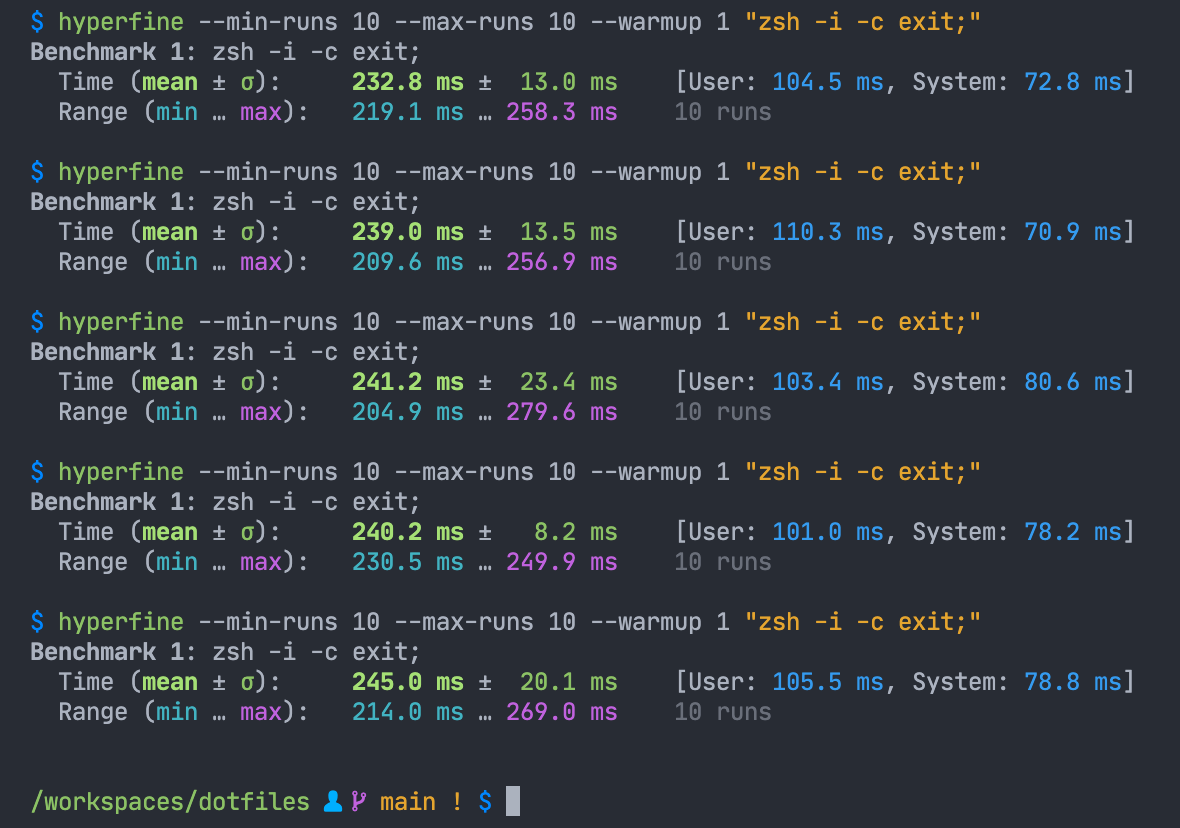
<p>Here's my prezto-based shell env using the powerlevel10k prompt (with gitstatusd) run in a VS Code Remote Container terminal (I know it has it's own performance issues, but this is where I spend a lot of time):</p>

<p><img src="/img/dotfiles-prezto.png" alt="Timing my prezto-based prompt" /></p>

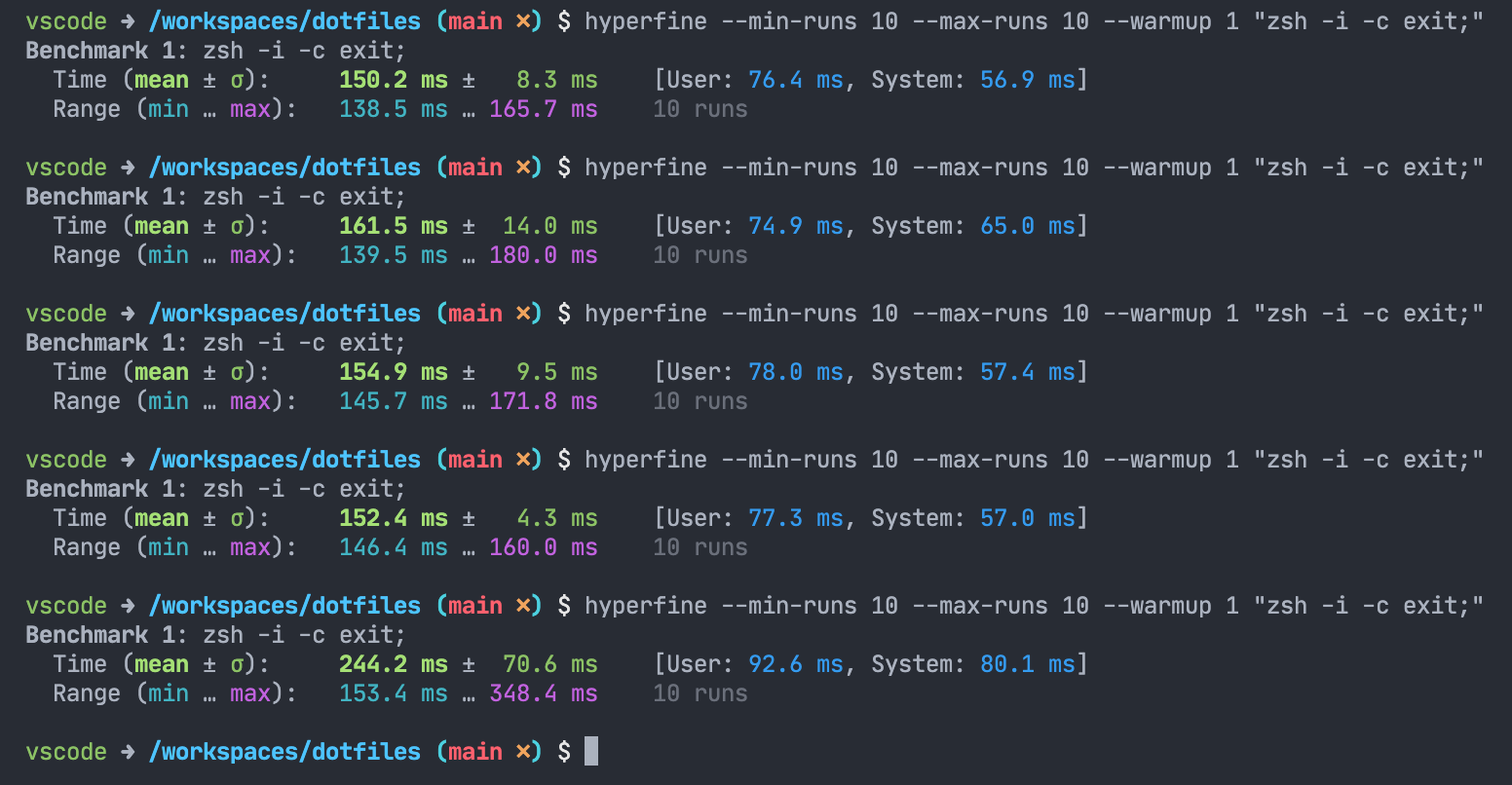
<p>And this is Oh My ZSH:</p>

<p><img src="/img/dotfiles-oh-my-zsh.png" alt="Timing my OMZ-based prompt" /></p>

<p>Wow!! This is quite the improvement, and this is with Oh My ZSH using the ZSH VCS functions.</p>

<p>This told me something: this wasn't entirely my prompt at play as the repo in question isn't one of those known to perform badly. My framework (prezto) must be doing a lot more than I think it is. Time to fire up zprof.</p>

<h3 id="profiling-my-zsh-framework">Profiling my ZSH framework</h3>

<p>I've have this line at the top of my <code class="language-plaintext highlighter-rouge">.zshrc</code>:</p>

<div class="language-shell highlighter-rouge"><div class="highlight"><pre class="highlight"><code><span class="o">[</span> <span class="nt">-z</span> <span class="s2">"</span><span class="nv">$ZPROF</span><span class="s2">"</span> <span class="o">]</span> <span class="o">||</span> zmodload zsh/zprof
</code></pre></div></div>

<p>… and this at the end:</p>

<div class="language-shell highlighter-rouge"><div class="highlight"><pre class="highlight"><code><span class="o">[</span> <span class="nt">-z</span> <span class="s2">"</span><span class="nv">$ZPROF</span><span class="s2">"</span> <span class="o">]</span> <span class="o">||</span> zprof
</code></pre></div></div>

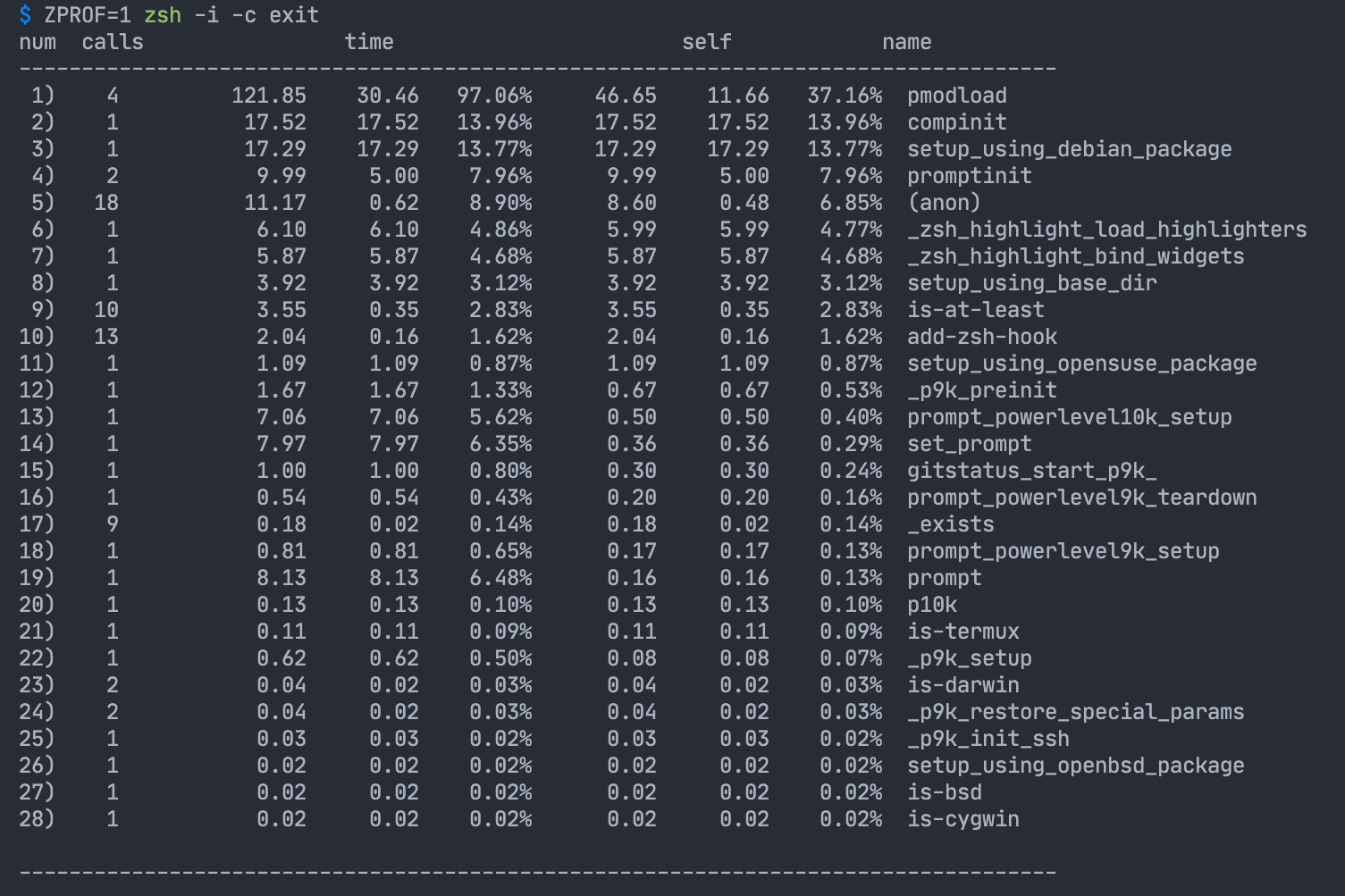
<p>This allows me to quickly profile my shell with a simple command: <code class="language-plaintext highlighter-rouge">ZPROF=1 zsh -i -c exit</code>. Running this was quite revealing:</p>

<p><img src="/img/prezto-zprof.png" alt="zprof of my prezto-based prompt" /></p>

<p>That <code class="language-plaintext highlighter-rouge">pmodload</code> is prezto's custom module loader, and it's been a very busy boy. I don't have that many modules enabled, and certainly none of the normal culprits that configure the likes of <code class="language-plaintext highlighter-rouge">rbenv</code>, <code class="language-plaintext highlighter-rouge">npmenv</code> etc, but I clearly have enough enabled for this to be the most prominant function call. Looking more closely at the profile output, I can see a lot of time was spent in compinit, which would be those modules pulling in their respective completions.</p>

<p>So I went digging into the <code class="language-plaintext highlighter-rouge">pmodload</code> function to see what it does and if I could improve it. It was then that I realised one of the downsides of using such a module system is pulling in each module is going to involve I/O but more importantly, repeated execution of the same few functions over and over and over again.</p>

<p>This got me thinking, what if I moved away from using a framework and smooshed my entire ZSH configuration down into a single file and optimise things to reduce I/O and repetition?</p>

<h3 id="smoosh-it-all-into-one-file">Smoosh it all into one file</h3>

<p>So down that rabbit hole I went. I dumped my entire ZSH environment into a single file and then started working my way through it removing things I didn't need, wasn't using, or didn't have a clue what they did. Things broke, big time. Why on earth did I think otherwise? 😝</p>

<p>Fixing this one file was going to take a very long time, so I took a step back and thought about starting from scratch and building things up again with performance measurement in mind. This seemed like a good idea as it would ultimately ensure I only had what I needed and would definitely end up with a fastest shell, but this would take a long time and I wanter fast things now so I went searching for examples of others moving away from a framework in favour of a "simplified approach" to see if someone had come up with a good approach.</p>

<p>It was during this that I stumbled upon <a href="https://www.reddit.com/r/zsh/comments/ipw8ap/do_you_guys_still_use_frameworks_and_plugins/g4mhc59/">this comment on Reddit</a> mentioning <a href="https://github.com/romkatv/zsh4humans/">zsh4humans</a>. Yes, it's a framework and not what I was looking for, but not one I'd seen before either, so I was intrigued. What's more, it's also from the same author of gitstatusd and powerlevel10k which I already use.</p>

<h3 id="zsh-for-humans">ZSH for Humans</h3>

<p>One Docker command later and I knew I was onto a winner. The default configuration looks a lot like my environment, pulls in gitstatusd and powerlevel10k and best of all, it's blazingly fast. Time to switch direction, stick with a framework, and move my configuration over from prezto.</p>

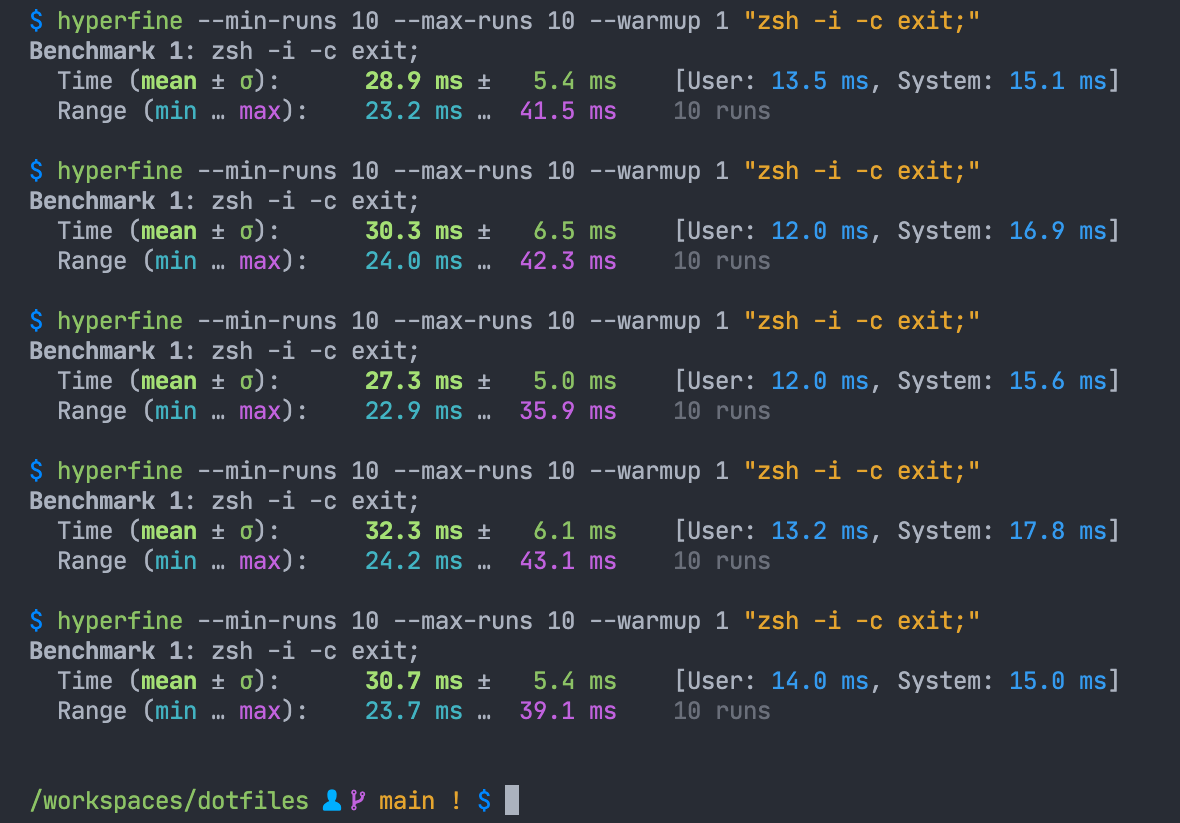
<p>A few days later and look at this:</p>

<p><img src="/img/dotfiles-zsh4humans.png" alt="Timing my zsh4humans-based prompt" /></p>

<p>That's a massive 87% improvement and my new shell environment 😁.</p>

<p>After all that effort, investigation and learning, it turns out I can have a fast shell environment with a framework: use ZSH For Humans.</p>]]></content><author><name>@lildude</name></author><category term="zsh" /><category term="shell" /><summary type="html"><![CDATA[ZSH has been my shell for well over fifteen years with my configuration framework of choice being prezto for the last eight years of those. In that time, I've tweaked my prompt and configuration as my needs have evolved and as I encountered performance issues, and it's those performance issues that drew me to dig into my ZSH configuration and prompt again.]]></summary></entry><entry><title type="html"></title><link href="https://lildude.co.uk/ive-spent-most-of-this" rel="alternate" type="text/html" title="" /><published>2021-01-30T17:53:37+00:00</published><updated>2021-01-30T17:53:37+00:00</updated><id>https://lildude.co.uk/ive-spent-most-of-this</id><content type="html" xml:base="https://lildude.co.uk/ive-spent-most-of-this"><![CDATA[<p>I’ve spent most of this last week being forced to work in a Windows 10 VM and coming to grips with it as a temporary dev env so it’s quite apt this came onto my radar today. Gonna tinker with these tips next week. <a href="https://chimerical.ca/posts/creating-my-awesome-windows-10-dev-setup">://</a></p>]]></content><author><name>@lildude</name></author><category term="dev" /><category term="windows" /><summary type="html"><![CDATA[I’ve spent most of this last week being forced to work in a Windows 10 VM and coming to grips with it as a temporary dev env so it’s quite apt this came onto my radar today. Gonna tinker with these tips next week. ://]]></summary></entry><entry><title type="html">GitHub Linguist Free Colour Picker</title><link href="https://lildude.co.uk/60591" rel="alternate" type="text/html" title="GitHub Linguist Free Colour Picker" /><published>2020-06-26T17:49:51+01:00</published><updated>2020-06-26T17:49:51+01:00</updated><id>https://lildude.co.uk/60591</id><content type="html" xml:base="https://lildude.co.uk/60591"><![CDATA[<p>I made a new thing today: <a href="https://lildude.github.io/linguist-free-colours/">GitHub Linguist Free Colour Picker</a> to make it easier to find a free colour when adding a language to <a href="https://github.com/github/linguist">Linguist</a>.</p>]]></content><author><name>@lildude</name></author><category term="note" /><summary type="html"><![CDATA[I made a new thing today: GitHub Linguist Free Colour Picker to make it easier to find a free colour when adding a language to Linguist.]]></summary></entry><entry><title type="html"></title><link href="https://lildude.co.uk/listened-to-one-of-the" rel="alternate" type="text/html" title="" /><published>2019-11-20T23:56:37+00:00</published><updated>2019-11-20T23:56:37+00:00</updated><id>https://lildude.co.uk/listened-to-one-of-the</id><content type="html" xml:base="https://lildude.co.uk/listened-to-one-of-the"><![CDATA[<p>Listened to one of the best keynotes I’ve ever heard at a tech conference this morning. As soon as the recordings are released, schedule 50min to watch Sandi Metz’s keynote. Factual, moving &amp; inline with a lot of my thoughts as an outsider looking at the US.</p>]]></content><author><name>@lildude</name></author><category term="rubyconf" /><summary type="html"><![CDATA[Listened to one of the best keynotes I’ve ever heard at a tech conference this morning. As soon as the recordings are released, schedule 50min to watch Sandi Metz’s keynote. Factual, moving &amp; inline with a lot of my thoughts as an outsider looking at the US.]]></summary></entry><entry><title type="html"></title><link href="https://lildude.co.uk/the-early-part-of-this" rel="alternate" type="text/html" title="" /><published>2019-11-19T02:27:33+00:00</published><updated>2019-11-19T02:27:33+00:00</updated><id>https://lildude.co.uk/the-early-part-of-this</id><content type="html" xml:base="https://lildude.co.uk/the-early-part-of-this"><![CDATA[<p>The early part of <a href="https://twitter.com/mcclure111/status/1196557401710837762">this Twitter thread</a> brings back so many fond memories &amp; frustrations from when I worked at Sun Microsystems on a SunRay everyday. Peeps often say Sun was so far ahead of the time they couldn’t sell it so I wasn’t expecting the Google Stadia turn.</p>]]></content><author><name>@lildude</name></author><summary type="html"><![CDATA[The early part of this Twitter thread brings back so many fond memories &amp; frustrations from when I worked at Sun Microsystems on a SunRay everyday. Peeps often say Sun was so far ahead of the time they couldn’t sell it so I wasn’t expecting the Google Stadia turn.]]></summary></entry><entry><title type="html"></title><link href="https://lildude.co.uk/teeny-tiny-icons" rel="alternate" type="text/html" title="" /><published>2019-11-17T22:33:40+00:00</published><updated>2019-11-17T22:33:40+00:00</updated><id>https://lildude.co.uk/teeny-tiny-icons</id><content type="html" xml:base="https://lildude.co.uk/teeny-tiny-icons"><![CDATA[<picture><source srcset="https://lildude.co.uk/g/img/34018e93d65840208be678033fb777fc-640-2761811df.webp 640w" type="image/webp" /><source srcset="https://lildude.co.uk/g/img/34018e93d65840208be678033fb777fc-640-dce15888c.jpg 640w" type="image/jpeg" /><img class="u-photo" loading="lazy" src="https://lildude.co.uk/g/img/34018e93d65840208be678033fb777fc-640-dce15888c.jpg" /></picture>

<p>How earth can you differentiate that many teeny tiny icons on your desktop? I bet you don’t look at them closely at all so stop kidding yourself. 🤣😂</p>]]></content><author><name>@lildude</name></author><category term="lookingButNotLooking" /><category term="businessClassTravel" /><summary type="html"><![CDATA[]]></summary></entry><entry><title type="html">Yay Worked out what was killing my Firefox…</title><link href="https://lildude.co.uk/52864" rel="alternate" type="text/html" title="Yay Worked out what was killing my Firefox…" /><published>2018-01-29T14:41:04+00:00</published><updated>2018-01-29T14:41:04+00:00</updated><id>https://lildude.co.uk/52864</id><content type="html" xml:base="https://lildude.co.uk/52864"><![CDATA[<p>Yay! Worked out what was killing my Firefox 58 &amp; 59 performance, especially on GitHub.com pages for some reason… the @okta Secure Web Authentication Plug-in. Disabled it and now I see the pref everyone is talking about.</p>]]></content><author><name>@lildude</name></author><category term="note" /><summary type="html"><![CDATA[Yay! Worked out what was killing my Firefox 58 &amp; 59 performance, especially on GitHub.com pages for some reason… the @okta Secure Web Authentication Plug-in. Disabled it and now I see the pref everyone is talking about.]]></summary></entry><entry><title type="html"></title><link href="https://lildude.co.uk/jeez-ive-written-some-hacky" rel="alternate" type="text/html" title="" /><published>2018-01-19T10:02:17+00:00</published><updated>2018-01-19T10:02:17+00:00</updated><id>https://lildude.co.uk/jeez-ive-written-some-hacky</id><content type="html" xml:base="https://lildude.co.uk/jeez-ive-written-some-hacky"><![CDATA[<p>Jeez, I've written some hacky code in the past. Just had my attention to something I wrote three years ago which is clearly a hack that doesn't work as I intended. It appears I realised this at the time but only half-backed out the changes 😊. Interestingly, that hacky code was peer-reviewed and accepted 😁.</p>]]></content><author><name>@lildude</name></author><category term="note" /><summary type="html"><![CDATA[Jeez, I've written some hacky code in the past. Just had my attention to something I wrote three years ago which is clearly a hack that doesn't work as I intended. It appears I realised this at the time but only half-backed out the changes 😊. Interestingly, that hacky code was peer-reviewed and accepted 😁.]]></summary></entry><entry><title type="html"></title><link href="https://lildude.co.uk/forcing-myself-to-use-the" rel="alternate" type="text/html" title="" /><published>2017-12-04T10:29:19+00:00</published><updated>2017-12-04T10:29:19+00:00</updated><id>https://lildude.co.uk/forcing-myself-to-use-the</id><content type="html" xml:base="https://lildude.co.uk/forcing-myself-to-use-the"><![CDATA[<p>Forcing myself to use the new, and apparently super-speedy, Firefox for all my desktop browsing starting today to see for myself just how quick it is. I'm also interested to see what the memory and power consumption is like now.</p>]]></content><author><name>@lildude</name></author><category term="note" /><summary type="html"><![CDATA[Forcing myself to use the new, and apparently super-speedy, Firefox for all my desktop browsing starting today to see for myself just how quick it is. I'm also interested to see what the memory and power consumption is like now.]]></summary></entry></feed>